 SQL Sage · AI pair-DBA for SSMS
Runs inside SQL Server Management Studio 22
Your AI pair-DBA for SSMS 22 — it proves what a change will break before you run it, and logs every action.
SQL Sage is an extension (add-in) you install inside SQL Server Management Studio 22 on Windows. Its interface is in English. It runs as part of SSMS — not a website, not an online SQL editor — and signs in, keyless, with your own Claude, ChatGPT or Codex account — no API key.
Before any ALTER or DROP it reads your database and proves the blast radius — the dependent views, procedures and triggers, the inbound foreign keys, the rows at risk — deterministically, not guessed. Every AI action is written to a tamper-evident local audit log you can export as evidence, and no write runs without passing a ScriptDom safety gate first.
SSMS 22 · Windows · signs in with Claude Code or Codex CLI · own it from $39 or subscribe from $29/yr
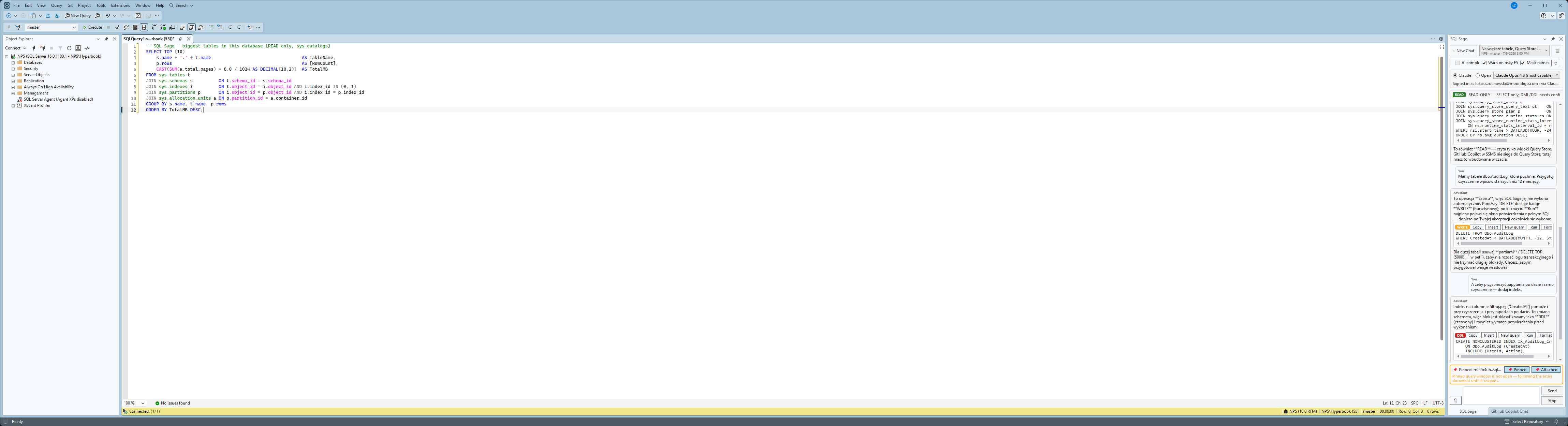
| What it is | A downloadable extension (VSIX add-in) you install inside SSMS — not a web app, not a standalone tool |
|---|---|
| Host | SQL Server Management Studio 22 (Windows 10 / 11) |
| Interface language | English |
| Sign-in | Your own Claude or ChatGPT account (OAuth); optional API key |
| AI providers | Anthropic Claude and OpenAI Codex / ChatGPT |
| Vendor | LumaSoft — independent; not affiliated with Microsoft, Anthropic, OpenAI or DBeaver |
Why it exists
Three things that break a DBA's flow — solved without leaving SSMS.
01
The red error you have to go read about
Msg 8134, divide by zero — again. SQL Sage sees the error in the Messages pane and your query, explains the real cause, and proposes a safe fix you can insert with one click.
02
"Why is this query slow?" — answered from the plan
Point it at the execution plan or a Query Store regression. It reasons over the actual plan and statistics, not a guess from the query text alone.
03
AI that wants to run SQL on production
Every statement is classified before it runs. Read-only executes; anything that writes or changes schema stops for your explicit approval, with the full SQL in front of you. A gate, not a hope — and every action it takes is written to a tamper-evident audit log.
What's inside
Everything a chat assistant should do in SSMS — and the DBA parts it usually skips.
Real captures from the live panel where a picture helps — everything else described in plain terms. All of it ships today.
01 Chat in the context of your connection
The chat is locked to one server and database, shown at the top at all times. Answers know which engine, version, and database they're talking about.
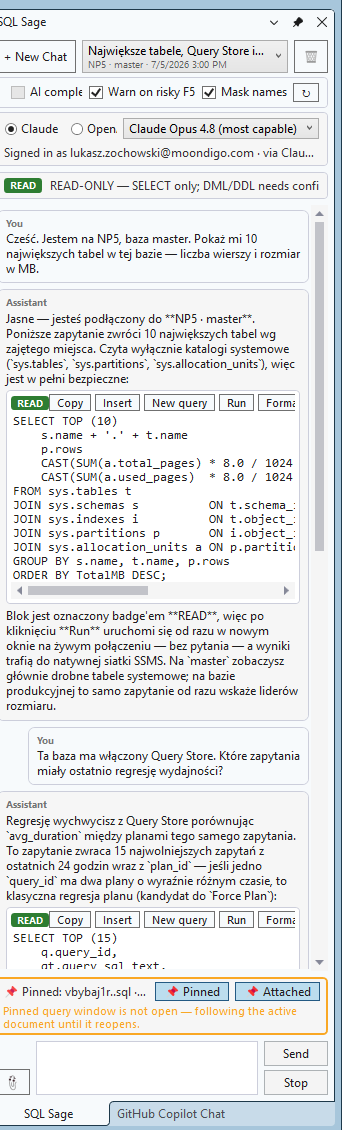
02 SQL block toolbar: Copy · Insert · New query · Run · Format
Every SQL block the assistant writes carries a READ / WRITE / DDL badge and one-click actions. Insert is never Run — putting text in your editor and executing it are two different buttons.
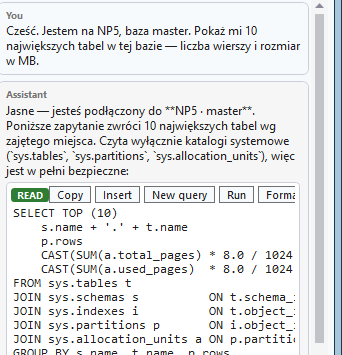
03 ScriptDom safety gate
Statements are classified by the same parser SSMS uses. SELECT runs read-only; DML and DDL require a confirmation dialog showing the exact SQL before anything executes.
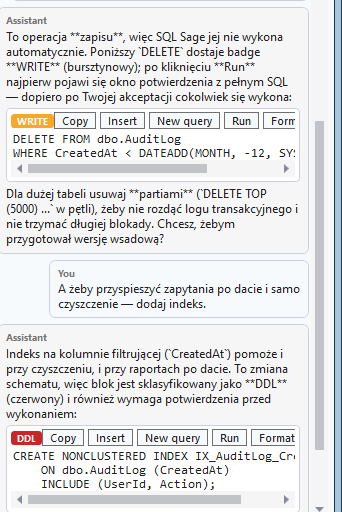
04 Query Store, built in
Ask for regressed queries, top consumers, or a stored plan. SQL Sage reads Query Store directly — something GitHub Copilot in SSMS doesn't do.
- Regressed queries — recent window vs an earlier baseline
- Top consumers by
duration,cpuorreads, over a chosen time window - The stored execution plan for any
query_id, incl. whether it's forced - Falls back to the plan cache when Query Store is off
05 Slash commands
/explain, /optimize, /fix, /doc on your attached query, plus /format with zero tokens. The commands DBAs expect, on the code you're looking at.
/explain·/optimize·/fix·/doc— act on the query you have open/querystore— top regressed and most expensive queries for this database/format— deterministic local formatting, zero tokens/help— the full list, in the panel
06 Right-click any SQL: Explain · Fix · Optimize · Document
Select T-SQL in a query window and pick an action from the editor's right-click menu — or press Ctrl+Alt+Shift+E/F/O/D. The chat opens with your SQL already in context; no copy-paste.
- Explain — a plain-language, step-by-step walkthrough
- Fix — find the bug and return the corrected query
- Optimize — indexing and rewrite suggestions, with reasoning
- Document — add clear comments and a purpose summary
- Also in the Tools menu; shortcuts shown next to each action
07 Deep performance diagnostics
The tuning parts Copilot in SSMS calls “out of scope”. SQL Sage runs the server-side DMVs itself and lets the model interpret real numbers — not guesses.
- One-click health check — backups, failed jobs, fragmentation, stale stats, memory pressure, risky options, in one scan
- Backup coverage & RPO risk — last full/diff/log per database, flagged
- Wait stats — engine-aware (box SQL Server vs Azure SQL), idle waits filtered
- Live blocking & deadlock history (
system_health: victim + lock graph) - Missing & unused indexes — cross-checked against the indexes you already have
- Execution plan — estimated and actual (real vs estimated rows)
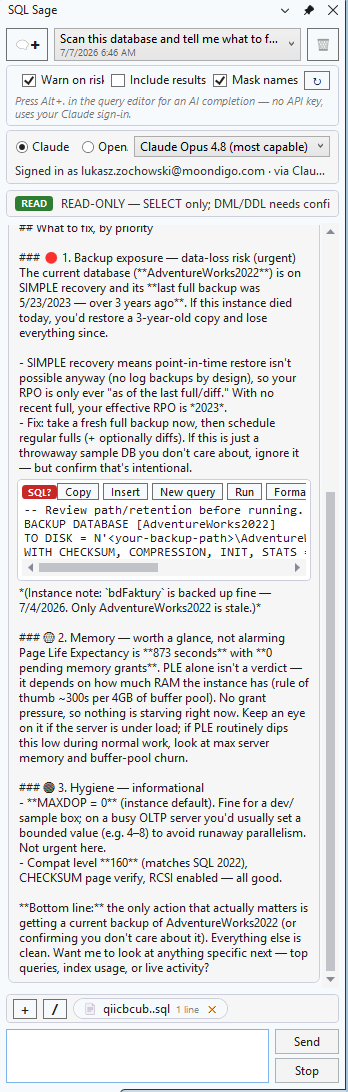
08 Change-Impact: prove the blast radius before you ALTER or DROP
Before it will recommend or run any ALTER or DROP, SQL Sage reads your database and shows exactly what breaks — deterministically, straight from the sys catalogs, not guessed.
- Referencing objects — views, procedures, functions, triggers, computed & CHECK/DEFAULT constraints
- Inbound foreign keys — the child tables that point at it
- Rows at risk — the row volume you'd lose on a
DROP - The object's own indexes
- Honest limit: static catalog analysis can't see dynamic (
EXEC/sp_executesql) or cross-database SQL — an empty list means "nothing static found", not "nothing breaks" - Engine-aware: box SQL Server, Azure SQL Database, Managed Instance
09 Permissions & role audit
Who can access what — a question Copilot in SSMS declines to answer. Read-only, database-scoped, with nested role membership expanded.
- Overview — every user and role, flagged for high privilege
- Per principal — effective (nested) roles plus explicit grants
- Per object — grantees, including column-level permissions
- Works on box SQL Server and Azure SQL Database
10 Claude and ChatGPT in SSMS — keyless, your own account
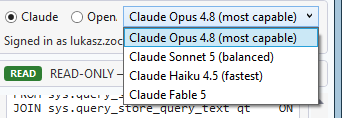
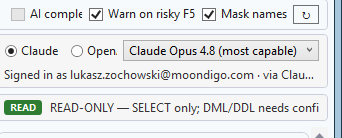
Use your own Claude (through Claude Code) or ChatGPT and Codex (through the Codex CLI) right inside SSMS — switch provider and model, keep your history. Keyless: powered by the account you already pay for, no API key, nothing resold or metered by us. The model list updates itself — new Claude and ChatGPT models appear in the picker without waiting for a plugin release.
11 Pin to a window
Working across five servers? Pin the chat to a specific query window so context never drifts to the wrong connection.

12 Privacy by default
Schema metadata and your query go to the model; query results never do, unless you opt in per session. Server and database names can be masked.
13 Portable skills
Reusable DBA playbooks as Anthropic SKILL.md files — versioned, shareable, and interoperable with Claude Code and GitHub Copilot in SSMS. Write a tuning or audit routine once; run it anywhere.
- Ships with deadlock-triage, blocking-triage, index-tuning, query-regression, db-health-review
- Reads your personal
~/.claude/skills— the same folder Copilot & Claude Code use - Open standard
SKILL.md— no lock-in; author once, reuse across machines & teams
14 Every AI action, logged — tamper-evident
Each thing the AI does to your database is recorded to a local, hash-chained audit log — so an edit, deletion or reorder of any entry still in the file is detectable. Export an evidence pack of what the AI did to production and who approved it.
- Records executes, confirmations and cancellations — with server/database, login, classification, SQL and row count
- Tamper-evident — a SHA-256 hash chain flags any altered or removed entry
- Evidence pack in Markdown + JSON, with a one-line integrity verdict
- Connection names can be masked in the export
- Honest scope: a bare append-only chain cannot prove the newest lines weren't dropped from the end — a tamper-evidence aid, not a certified or immutable compliance record
15 Incident Mode: one-click on-call triage that cites the proof
When production is on fire, one click tells you what's wrong — and cites the proof. The 🚑 Incident button runs a deterministic, read-only snapshot of what the server is doing right now, and every conclusion is grounded in a real number, not guessed.
- Blocking chain — who blocks whom, and for how long
- Top waits — each with its % share; on box SQL Server, also tempdb & log pressure
- Most expensive in-flight queries — elapsed / CPU, with the running SQL
- Keyless — reads the database deterministically; no provisioned cloud AI needed
- Edition-aware: box SQL Server and Azure SQL Database (right database-scoped DMVs +
VIEW DATABASE STATEon Azure) - Honest scope: a point-in-time snapshot of server state (DMV counters are cumulative) — reads server state only, never table data
16 Prove-It: prove an AI rewrite returns the same rows
Don't take the AI's word that a rewrite is equivalent — prove it. When SQL Sage (or you) optimizes or rewrites a query, one click runs both versions and checks whether the rewrite returns the same rows as the original — with the numbers behind it, not a claim.
- One click after any rewrite — a deterministic, server-side multiset fingerprint compares the two result sets order-independently and duplicate-aware, catching lost or duplicated rows that a naive
DISTINCT/EXCEPTcheck misses - Clear verdict — EQUIVALENT, DIFFERENT (with the differing rows, if you've enabled results), or an honest UNDECIDABLE when it genuinely can't be proven (a nondeterministic function like
GETDATE()/NEWID(), orTOPwithoutORDER BY) — it says so instead of guessing - Logical-reads delta — so you see how much cheaper the rewrite actually is, side by side
- Runs read-only in a rolled-back transaction, costs zero AI tokens (deterministic C#/SQL — works on the free CLI), on box SQL Server and Azure SQL Database, and every proof is written to the tamper-evident audit log
- Honest scope: verified on your current data right now — not a proof for all possible data — and it compares the row multiset (order-independent), so it doesn't prove ordering
17 Connect a repository — code-aware chat preview
Connect your application's source repository so the assistant reasons about your app code alongside the database — schema, queries and the code that uses them, in one context. Opt-in, per repository. Repository access runs on the Claude channel only (for now) — a deliberate security choice, explained below.
- Opt-in per repository — you consciously turn on access, one repo at a time
- Native file, shell and search tools are disabled while a repo is connected. The assistant sees only a filtered, secret-free copy of your repository through SQL Sage's own read and search tools — never your live disk. Secret files (
.env,appsettings*.json, keys /*.pem,.git/) are excluded before anything is sent, and the copy is deleted when you disconnect. - Claude channel only — on purpose. This fence works because on the Claude channel we can turn off the native file tools and serve only the filtered copy through our own tools. The OpenAI Codex sandbox restricts what the process is allowed to do, not which files are read, so we don't enable repo access there rather than risk exposing your other credentials. We enable it only where we can fence off secrets this way — Codex will follow once we can do that just as safely.
- SQL execution is unchanged — SELECT auto-runs; writes and DDL still stop for confirmation
- Honest scope: code-aware chat (preview) — it reasons about your code next to the database, but does not yet prove which line of code produced a given query
18 See what's sent — and what it costs
An egress panel shows the exact payload leaving for the model — schema and your query (plus connected-repo code when a repo is attached), never your data unless you opt in. A live token counter and a heads-up before large operations keep the cost in view.
- Egress indicator & “what's sent to the API” panel — inspect the precise schema + query payload before it leaves; query results never go unless you opt in per session
- Live token-usage counter — watch consumption as you chat, with a warning before large operations
- Guided first run — an onboarding empty-state with example prompts gets you productive in seconds
Honest comparison
GitHub Copilot in SSMS is free. Here's when you'd want SQL Sage instead.
Copilot suggests changes; SQL Sage proves their blast radius first — and logs every action. If Copilot works for you and your org allows it, use it — the table shows where it wins, too. SQL Sage is for the cases it doesn't cover: deterministic, provable, accountable DBA work on the AI account you already pay for.
| GitHub Copilot in SSMS | Redgate SQL Prompt | SQL Sage | |
|---|---|---|---|
| Sign in with your own Claude / ChatGPT account | No — GitHub account required | n/a | Yes — Claude Code or Codex |
| Works where GitHub is blocked by policy | No | Yes | Yes |
| Parser-level statement classification (not just approval) | Read-only default; you approve writes | n/a | Same, plus a ScriptDom parser gate |
| Purpose-built deterministic DBA tools (Query Store, backups, indexes, waits) | Agent can run SQL; no dedicated tools | No | Yes — values read from the server |
| Reads your application source code alongside the database (opt-in) | No — database only | n/a | Preview — Claude channel only; opt-in, per repository |
| Deterministic blast-radius proof before ALTER / DROP | Agent can run SQL; no dedicated proof | No | Yes — dependents, inbound FKs, rows & indexes |
| Tamper-evident audit log + evidence export | No | No | Yes — hash-chained · Markdown + JSON |
| One-click incident triage that cites live server metrics | Agent can run SQL; needs provisioned Azure OpenAI | No | Yes — keyless, cited from live DMVs |
| Proves an AI rewrite returns the same rows | Suggests rewrites; no equivalence proof | Suggestions only; no proof | Yes — deterministic multiset, keyless |
| Deterministic SQL formatting | No | Yes | Yes (ScriptDom) |
| Inline completions (ghost text) | Yes | Yes | Optional (own key) · keyless planned |
| Second AI bill / metered tokens | Copilot plan · usage-based billing | n/a | No — your own account |
| Free tier to start | Yes — limited free | No | 30-day free trial, then paid |
| Native in SSMS, Microsoft-signed | Yes | Third-party (signed) | Third-party VSIX · signing in progress |
| Price | Free tier + usage-based paid | from ~$255/yr | $39 once or $29/yr · 30-day free trial |
Built for production
Trust is the feature.
A tool that can run SQL on your production server has to earn its place. Here's how.
Read-only by default
Every statement is classified before it runs. Writes and DDL never auto-execute — you approve the exact SQL, and you can edit it first.
One connection, always visible
The chat locks to one server and database, shown at the top. You always know which server an answer will touch.
Your data stays yours
Schema metadata is not your data. Query results are never sent to the model without your explicit, per-session opt-in. Server and database names can be masked.
We never hold your tokens
You sign in through Claude Code or Codex on your own machine. On that keyless path SQL Sage only asks the CLI whether you're signed in — it never sees, stores, or transmits your credentials. An optional own API key is the exception, and stays DPAPI-encrypted on your machine.
Pricing
Own it once, or subscribe. Your call.
Buy a perpetual licence and keep it forever, or subscribe for the always-latest build. Either way you bring your own Claude or ChatGPT account — nothing metered or resold by us. Start with a 30-day free trial, all features, no credit card.
Own it — one-time
Personal
Individual DBAs & consultants
12 months of updates included, then optional maintenance ~$19/yr.
Buy PersonalPro popular
Small teams & power users
12 months of updates included, then optional maintenance ~$39/yr.
Buy ProTeam
Teams, priority support
12 months of updates included, then optional maintenance ~$89/yr.
Buy TeamSubscription — always latest
Personal
Individual DBAs & consultants
Always the latest version, updates included, cancel anytime.
Subscribe — PersonalPro popular
Small teams & power users
Always the latest version, updates included, cancel anytime.
Subscribe — ProTeam
Teams, priority support
Always the latest version, updates included, cancel anytime.
Subscribe — Team// 30-day free trial, no card. Secure hosted checkout via our payments provider (merchant of record). Prices in USD.
Get it
Install in two minutes.
Windows · x64 or Arm64 · ~ a few MB · v{ver} · 30-day trial starts on first run
Signed by LUMA sp. z o.o. A new installer may be flagged “not commonly downloaded” — that's normal; click Allow / Keep.
Requirements
- SQL Server Management Studio 22 (Windows, x64 or Arm64)
- Claude Code or Codex CLI installed and signed in — that's how SQL Sage reaches the AI. Links below.
- Admin rights for install (writes to Program Files, standard for SSMS extensions)
Steps
- Close SSMS.
- Run
SqlSageSetup.exeand approve the UAC prompt. - Reopen SSMS — the SQL Sage panel opens automatically.
- Sign in with Claude or OpenAI in the panel's status bar, and start chatting.
Windows SmartScreen? Here's what to expect.
When you run the installer, Windows may show “Windows protected your PC.” This is normal for a newly-published app that hasn't built up download history yet — not a sign anything is wrong, and not a virus detection. The installer is validly signed: the dialog itself will name the publisher as LUMA SPÓŁKA Z OGRANICZONĄ ODPOWIEDZIALNOŚCIĄ. The prompt fades away on its own as more people install.
Get past it in two clicks:
- Click More info in the “Windows protected your PC” dialog. It expands to show App: SqlSageSetup.exe and Publisher: LUMA SPÓŁKA Z OGRANICZONĄ ODPOWIEDZIALNOŚCIĄ — match that name. An unsigned impostor would read Unknown publisher instead.
- Click Run anyway. The installer starts — and your clean install is one more toward the reputation that makes the prompt disappear for everyone.
Verify your download (optional)
Prefer to check the file yourself? Match its SHA-256 against the hash we publish for this exact build (v{ver}):
SHA-256: CE28A522EDED29D98C77FC64629576CE9E40E193772F06ACD580F39B653091E3
In PowerShell: Get-FileHash SqlSageSetup.exe -Algorithm SHA256
Questions
Frequently asked.
Is SQL Sage a website or an extension I install?
SQL Sage is an extension (add-in) you install inside SQL Server Management Studio 22 on Windows. It runs as part of SSMS on your own machine. It is not a website, not an online SQL editor, and not a standalone app. "Keyless" means it uses the Claude or ChatGPT account you already have instead of a separate API key — it does not mean it runs in the cloud.
Now that Copilot in SSMS can read the database too, what makes SQL Sage different?
SQL Sage doesn't just read your database — it proves and logs what changes. Before any ALTER or DROP it deterministically reports the blast radius — dependent views, procedures, functions, triggers and constraints, inbound foreign keys, rows at risk and the object's indexes — read straight from the system catalogs, not guessed. Every AI action is written to a tamper-evident, hash-chained local audit log you can export as an evidence pack (Markdown + JSON) of what the AI did to production and who approved it. The honest limit: static catalog analysis cannot see dynamic (EXEC / sp_executesql) or cross-database SQL, and SQL Sage states that plainly rather than guessing around it. The audit log is a tamper-evidence aid, not a certified or immutable compliance record.
What language is SQL Sage in?
SQL Sage is an English-first product: the extension's interface and documentation are in English. This marketing website is additionally available in Polish, German, Spanish and French, but the product itself is English.
Do I need a GitHub account or a Copilot license?
No. SQL Sage signs in with your own Claude or ChatGPT account through Claude Code or Codex.
Does SQL Sage work with Claude, ChatGPT, or Codex?
Yes. SQL Sage is keyless — it drives the AI account you already have: your own Claude through Claude Code, or ChatGPT and Codex through the Codex CLI. There's no separate API key, and no GitHub or Microsoft account. It's an independent extension by LumaSoft, not affiliated with Anthropic, OpenAI, or Microsoft.
Do you resell tokens or add a markup?
No. The AI runs on the account you already have. We never meter or resell usage.
Can it run destructive SQL on my database?
Not without you. Reads run automatically; writes and DDL stop for a confirmation dialog showing the exact SQL. Classification happens before execution.
Does my data get sent to the AI?
Schema metadata and the query text do. Query results never leave your machine unless you opt in per session. Names can be masked.
Why does Windows warn me when I run the installer?
The installer is validly Authenticode-signed and timestamped by LUMA SPÓŁKA Z OGRANICZONĄ ODPOWIEDZIALNOŚCIĄ — you'll see exactly that publisher name in the SmartScreen dialog after clicking More info. Windows still shows an "unrecognized app" notice because the file and publisher are newly published and haven't accrued download reputation yet; Microsoft builds that up over several weeks and hundreds of clean installs, and since 2024 even EV certificates no longer skip this step — there is no paid shortcut. So it's a reputation stage, not a malware detection. Click More info then Run anyway. For extra assurance you can verify the download against the SHA-256 we publish on the download page (Get-FileHash SqlSageSetup.exe -Algorithm SHA256). Nothing to worry about — every clean install helps the warning fade for everyone.
Which SSMS versions are supported?
SSMS 22. SSMS 21 support is under evaluation.
Does it work with Azure SQL?
The assistant is engine- and Azure-aware. Full Azure SQL / Managed Instance connectivity with Entra auth is on the roadmap.
Does it do inline completions like Copilot?
Optionally. Ghost-text completions in the query editor are an opt-in advanced feature that today uses your own Anthropic key; keyless completions for paid plans are on the roadmap. Chat, query help and safe execution need no key — just sign in with Claude or ChatGPT.
Is it affiliated with Microsoft, Anthropic, or OpenAI?
No. SQL Sage is an independent extension by LumaSoft.
How much does it cost?
Your choice. Own it once — Personal $39, Pro (5 seats) $79, Team (10 seats) $179, with 12 months of updates included. Or subscribe for the always-latest build — Personal $29/yr, Pro $59/yr, Team $129/yr. Every install starts with a 30-day free trial, all features, no credit card. You bring your own Claude or ChatGPT account; we never meter or resell usage.
Stay posted
Get told when there's something new.
One email when there's a new release. No spam, no card. This is optional — you don't need it to download or start your trial.
Email us to be notifiedWe'll reply once, when there's something to try. That's it.